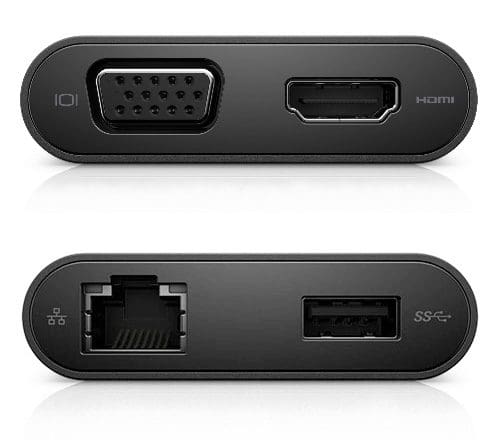
Has been almost a year that I bought my dell XPS developers edition with the DA200 adapter, which only works with low resolutions due to a published bug. http://en.community.dell.com/support-forums/software-os/f/3525/t/19999974 . Other USB-C to HDMI adapters / docks also fail with the same.
During all this time there was no solution without compiling and patching the kernel, as described here : https://patchwork.kernel.org/patch/9646451/ .
I was using Ubuntu 16.04.3 LTS with the Kernel 4.10 before the upgrade, with the latest Intel drivers and Gnome Shell enviroment.
🚀 ¿Te interesa la tecnología que realmente importa?
En la comunidad compartimos herramientas, workflows y automatizaciones que usamos en el día a día. Sin teoría — pura práctica.
👥 Entrar a la comunidadOn the 3rd of September of 2017, the Linux Kernel 4.13 was released, and included the patch about this particular driver. You can see more information about this here : https://lkml.org/lkml/2017/9/3/155
What we are going to do now, is simple install this version of the kernel in order to fix the issue. By the way, in this moment I am writing with my external monitor connected through my USB-C/HDMI converter.
Downloading the Kernel 4.13
We download from the official site, http://kernel.ubuntu.com/~kernel-ppa/mainline/v4.13/. In my case I will download the 64bit debs.
- wget http://kernel.ubuntu.com/~kernel-ppa/mainline/v4.13/linux-headers-4.13.0-041300_4.13.0-041300.201709031731_all.deb
- wget http://kernel.ubuntu.com/~kernel-ppa/mainline/v4.13/linux-headers-4.13.0-041300-generic_4.13.0-041300.201709031731_amd64.deb
- wget http://kernel.ubuntu.com/~kernel-ppa/mainline/v4.13/linux-image-4.13.0-041300-generic_4.13.0-041300.201709031731_amd64.deb
After downloading the kernel packages, we just install them.
sudo dpkg -i *.deb
and once everything is installed properly, we just reboot. Now everything should be working as it should.
I hope it is useful for you !
🚀 ¿Te interesa la tecnología que realmente importa?
En la comunidad compartimos herramientas, workflows y automatizaciones que usamos en el día a día. Sin teoría — pura práctica.
👥 Entrar a la comunidad
Los comentarios están cerrados.